Digital Thermostat Controller Socket, Power Alarm

NOK 119,00
+ NOK 147,99 i frakt

Digital Thermostat Controller Socket, Power Alarm

  • Merke: Unbranded
Solgt av:

Digital Thermostat Controller Socket, Power Alarm

  • Merke: Unbranded

NOK 119,00

Spar NOK 390,00 (76%)

Veiledende pris

NOK 509,00
På lager
+ NOK 147,99 i frakt

14-dagers returpolicy

Solgt av:

NOK 119,00

Spar NOK 390,00 (76%)

Veiledende pris

NOK 509,00
På lager
+ NOK 147,99 i frakt

14-dagers returpolicy

Betalingsmåter:

Beskrivelse

Digital Thermostat Controller Socket, Power Alarm

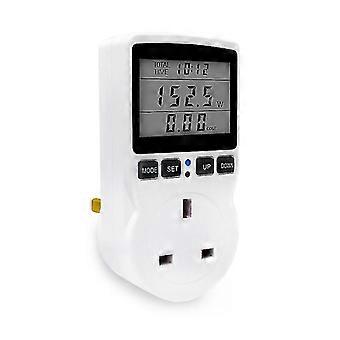
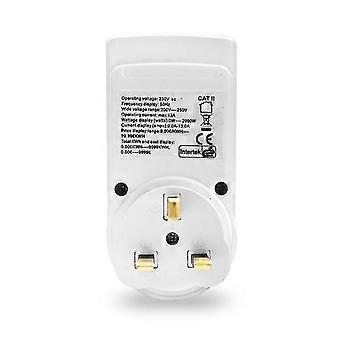
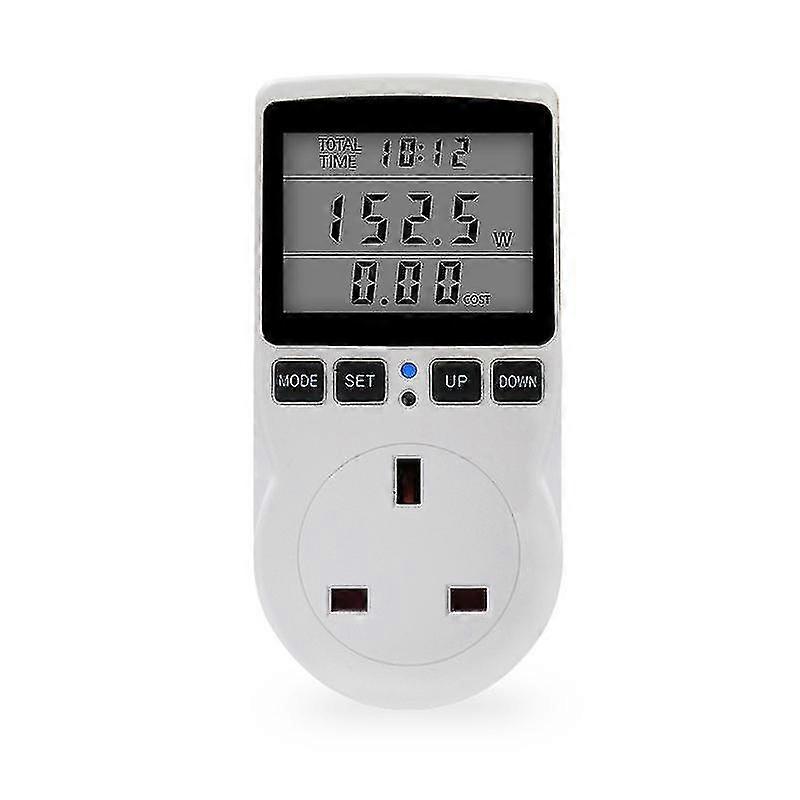
Electricity price setting 1. Press and hold the SET button for more than 3 seconds, the COST/KWH in the lower right corner of the third row of the LCD screen will flash, and enter the electricity price setting. 2. Press the MoDE button to select the location, then press the UP button and DOWN button to set the value, press the UP button to increase the number, press the DOWN button to decrease the number, after the price is set, press the SET button to exit the price setting and return to the LCD DISPLAY interface, press 10 If there is no operation for more than 2 seconds, the data will be automatically saved and the price setting will be exited 3. Press the SET key, the third line of the LCD will display the electricity price. 3. LED indication function, When it is detected that the load power is greater than 2W, the cumulative time starts counting, the LED indicator light is on, and the LED flashes when an alarm occurs. 4. Overload alarm function, When the load of the socket connected to the power socket exceeds the set overload alarm power, the LCD flashes the second row of OVERLAOD, and the indicator light flashes at the same frequency (the backlight LED also flashes at the same frequency), reminding the user that the electrical appliance is overloaded 1. Press and hold the MODE+SET button for more than 3 seconds at the same time. The LCD screen OVERLOAD flashes and enters the overload power setting. 2. Press the MODE key, press the UP key and the DOWN key to set the value, press the UP key to increase the value, press the DOWN key to decrease the value, set the SET key to exit the setting and return to the LCD DISPLAY interface, if there is no operation for more than 10 seconds, the data will be automatically saved and exited Overload power setting. 5. KWH alarm function When the cumulative power consumption reaches the set alarm power consumption, the word KWH ALARM will flash on the second line of the LCD, and the indicator light will flash at the same frequency (the backlight LED will also flash at the same frequency), reminding the user that the power is insufficient and the power consumption exceeds the standard, please save use electricity. 1. Press and hold the MODE+DOWN key at the same time for more than 3 seconds. KWH ALARM on the LCD screen flashes, and enters the power consumption alarm setting. 2. Press the MODE key, press the UP key and the DOWN key to set the value, press the UP key to increase the value, press the DOWN key to decrease the value, set the SET key to exit the setting and return to the LCD DISPLAY interface, press more for more than 10 seconds without any operation to automatically save the data and exit Power consumption alarm settings. 6.coST alarm function When the electricity charge reaches the set alarm charge, the word COST ALARM will flash on the second line of the LCD, and the indicator light will flash at the same frequency (the backlight LED will also flash at the same frequency), reminding the user that the power has reached the set value, please save electricity and save your money. 1. Press and hold the MODE+UP button for more than 3 seconds at the same time, and the LCD screen COST ALARM will flash. Enter the electricity bill alarm setting. 2. Press the MODE key, press the UP key and the DOWN key to set the value, press the UP key to increase the value, press the DOWN key to decrease the value, set the SET key to exit the setting and return to the LCD DISPLAY interface, press more for more than 10 seconds without any operation, the data will be automatically saved and saved Exit the electricity bill alarm setting. 7. Backlight function, (optional) Connect to power supply. If you dont press any button, the backlight will turn off after 15 seconds. When any button is pressed, the backlight will glow again. (Backlight only glows when connected to AC power) Rated voltage: 230Vac/50Hz Load current: MAX 16A; Voltage range: 200Vac ~2500Vac; Time display range: 0 seconds to 9999 days. Power display range: 0.oW9999wi. Voltage display range: 0.ov9999v; Current display range: 0.000A9999A. Frequency display range: 0Hz9999Hz; Cumulative power consumption: 0.000KWH to 9999KWH. The price range is from 0.0ocoST/KWH to 99.99cOST/KWH. Total power display range 0.0oCOST ~ 9999cOST; voltage accuracy: +1% Current Accuracy: +2% Power Accuracy: +2% Shipment Quantity: 1 piece Product color: as shown
  • Fruugo-ID: 170414597-364302611
  • EAN: 715001980267

Produktsikkerhetsinformasjon

Vennligst se produktsikkerhetsinformasjonen som er spesifikk for dette produktet skissert nedenfor

Følgende informasjon er gitt av den uavhengige tredjepartsforhandleren som selger dette produktet.

Produktsikkerhetsetiketter

CE Mark
Sikkerhetsadvarsler: Not suitable for children under 36 months

Levering og retur

Sendes i løpet av 2 dager

  • STANDARD: NOK 147,99 - Levering mellom kl fre. 13 februar 2026–man. 23 februar 2026

Sendes fra Kina.

Vi gjør vårt beste for å sikre at produktene du bestiller, leveres til deg i sin helhet og i samsvar med dine spesifikasjoner. Skulle du likevel motta en ufullstendig bestilling eller andre varer enn dem du bestilte, eller hvis du av en eller annen grunn ikke er fornøyd med bestillingen, kan du returnere bestillingen eller enkeltvarer i bestillingen og motta full refusjon for varene. Se fullstendige retningslinjer for retur

Produktoverholdelsesdetaljer

Vennligst se samsvarsinformasjonen som er spesifikk for dette produktet skissert nedenfor.

Følgende informasjon er gitt av den uavhengige tredjepartsforhandleren som selger dette produktet.

Produsent:
Følgende informasjon skisserer kontaktinformasjonen til produsenten av det aktuelle produktet som selges på Fruugo.

  • Shenzhen Quanqiulegou Supply Chain Co., Ltd
  • Shenzhen Quanqiulegou Supply Chain Co., Ltd
  • Room 603 Huajingleyuan,No. 163,Meibandadao,Minzhijiedao,Longhuaxinqu
  • Shenzhen
  • CN
  • 518000
  • qqlgfgo@yeah.net
  • 13590471039
  • https://www.fruugo.co.uk/search?merchantId=17651

Ansvarlig person i EU:
Følgende informasjon skisserer kontaktinformasjonen til den ansvarlige personen i EU. Den ansvarlige personen er den utpekte økonomiske aktøren basert i EU, som er ansvarlig for samsvarsforpliktelsene knyttet til det relevante produktet som selges til EU.

  • SUCCESS COURIER SL
  • SUCCESS COURIER SL
  • CALLE RIO TORMES NUM. 1, PLANTA 1, DERECHA, OFICINA 3,Fuenlabrad a
  • Madrid
  • ES
  • 28947
  • successservice2@hotmail.com
  • 34910602659
  • https://www.fruugo.co.uk/search?merchantId=17651